Test Setup
Synthetic 35×35 image with a 9×9 square and a central keypoint. Crop a 15×15 ROI (slightly offset), resample to 32×32, run segmentation + keypoint detection, map results back to the original grid.
import numpy as npimport matplotlib.pyplot as pltdef create_test_image():= np.zeros((35 ,35 ), dtype= np.float32)= 35 // 2 = 4 - half:c+ half+ 1 , c- half:c+ half+ 1 ] = 1.0 = 5 return imgdef get_segmentation(img, threshold= 0.5 ):return (img >= threshold).astype(np.uint8)def get_keypoint(img):= np.array(np.where(img >= 3 ))if candidates.size > 0 := candidates[0 ].mean()= candidates[1 ].mean()return np.array([y, x])return np.array([0.0 , 0.0 ])= 10 ; ROI_START_X = 10 ; ROI_SIZE = 15 = ROI_START_Y + ROI_SIZE= ROI_START_X + ROI_SIZE= 32 = create_test_image()= np.array([17 , 17 ])print ("Original shape:" , original_img.shape)
Helper for plotting results.
def plot_result(original_img, segment_result, keypoint_result, method_name, true_keypoint):= (8 ,6 ))= 'gray' , alpha= 0.7 )if segment_result is not None := [0.5 ], colors= 'red' , linewidths= 2 )if keypoint_result is not None and len (keypoint_result)> 0 :if keypoint_result.ndim == 1 :1 ], keypoint_result[0 ], 'ro' , markersize= 8 , label= 'Detected' )else :0 ,1 ], keypoint_result[0 ,0 ], 'ro' , markersize= 8 , label= 'Detected' )1 ], true_keypoint[0 ], 'g+' , markersize= 12 , markeredgewidth= 3 , label= 'Ground Truth' )if keypoint_result is not None and len (keypoint_result)> 0 := np.linalg.norm((keypoint_result if keypoint_result.ndim== 1 else keypoint_result[0 ]) - true_keypoint)0.02 , 0.98 , f'Error: { err:.3f} px' , transform= plt.gca().transAxes,= dict (boxstyle= 'round' , facecolor= 'white' , alpha= 0.8 ), va= 'top' )f' { method_name} Result' ); plt.grid(True , alpha= 0.3 ); plt.show()
Pipeline Definition
Crop: extract 15×15 ROI from 35×35 image
Resample: resize ROI to 32×32
Analyze: segmentation + keypoint detection
Map back: transform results to original space
We implement with different libraries.
Method 1: SimpleITK
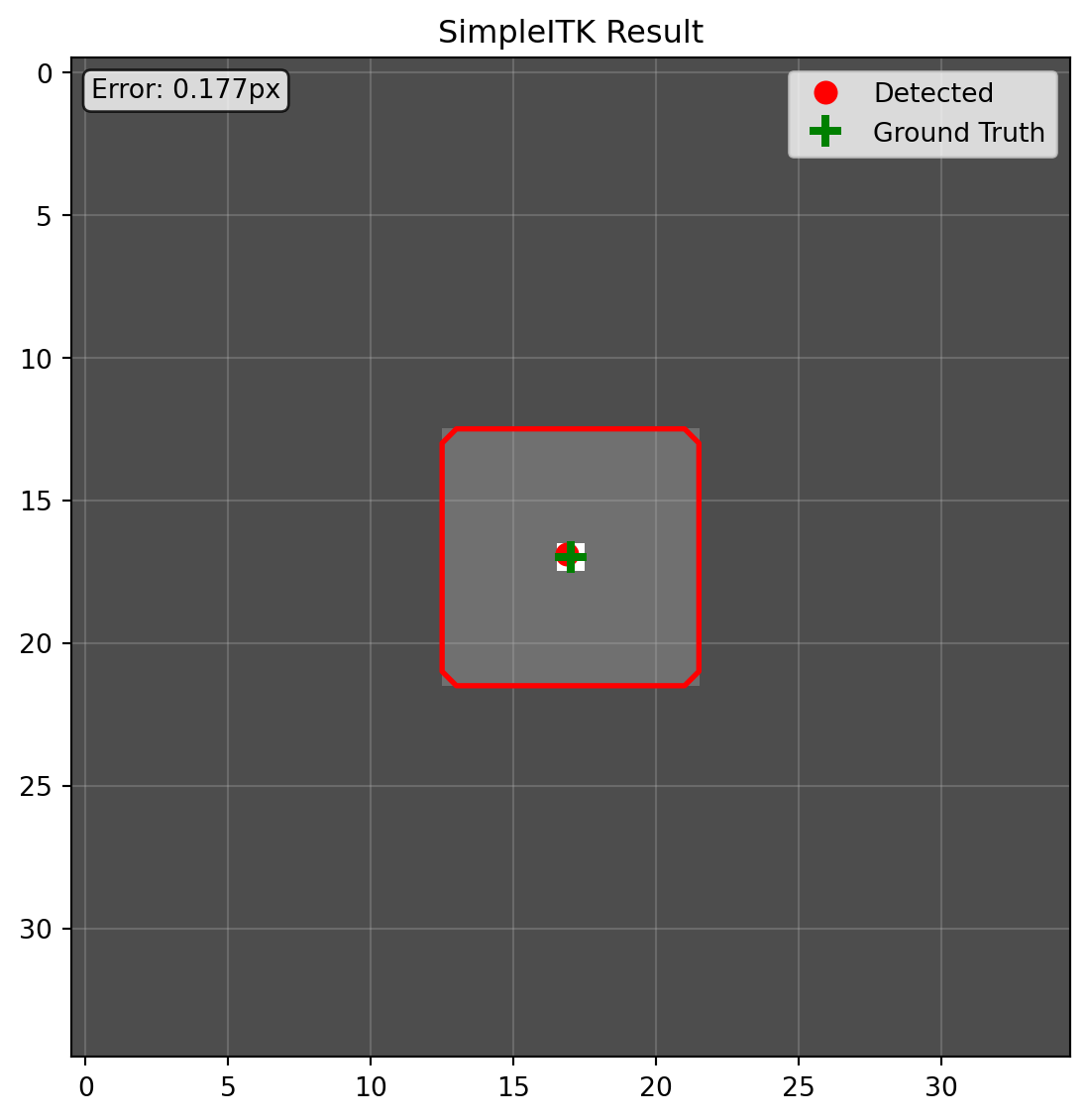
import SimpleITK as sitkdef process_with_simpleitk(img):= sitk.GetImageFromArray(img)1.0 , 1.0 ]); sitk_img.SetOrigin([0.0 , 0.0 ])= [ROI_SIZE, ROI_SIZE]= [ROI_START_X, ROI_START_Y]= sitk.RegionOfInterest(sitk_img, roi_size, roi_start)= [TARGET_SIZE, TARGET_SIZE]= roi_img.GetSpacing()= [roi_size[i] * original_spacing[i] for i in range (2 )]= [physical_size[i] / target_size[i] for i in range (2 )]= sitk.ResampleImageFilter()0 )= resampler.Execute(roi_img)= sitk.GetArrayFromImage(resampled_img)= get_segmentation(resampled_array)= get_keypoint(resampled_array)= np.array(roi_size) / np.array(target_size)= keypoint * scale_factor= keypoint_roi + np.array([roi_start[1 ], roi_start[0 ]])= sitk.GetImageFromArray(segment.astype(np.float32))= sitk.ResampleImageFilter()0 )= back_resampler.Execute(segment_sitk)= sitk.GetArrayFromImage(segment_roi)= np.zeros(img.shape, dtype= np.uint8)= segment_roi_arrayreturn segment_original, keypoint_originalprint ("=== SimpleITK ===" )= process_with_simpleitk(original_img)"SimpleITK" , true_keypoint)
Issues: verbose resampling setup, manual coordinate math, easy axis mistakes.
Method 2: scipy.ndimage
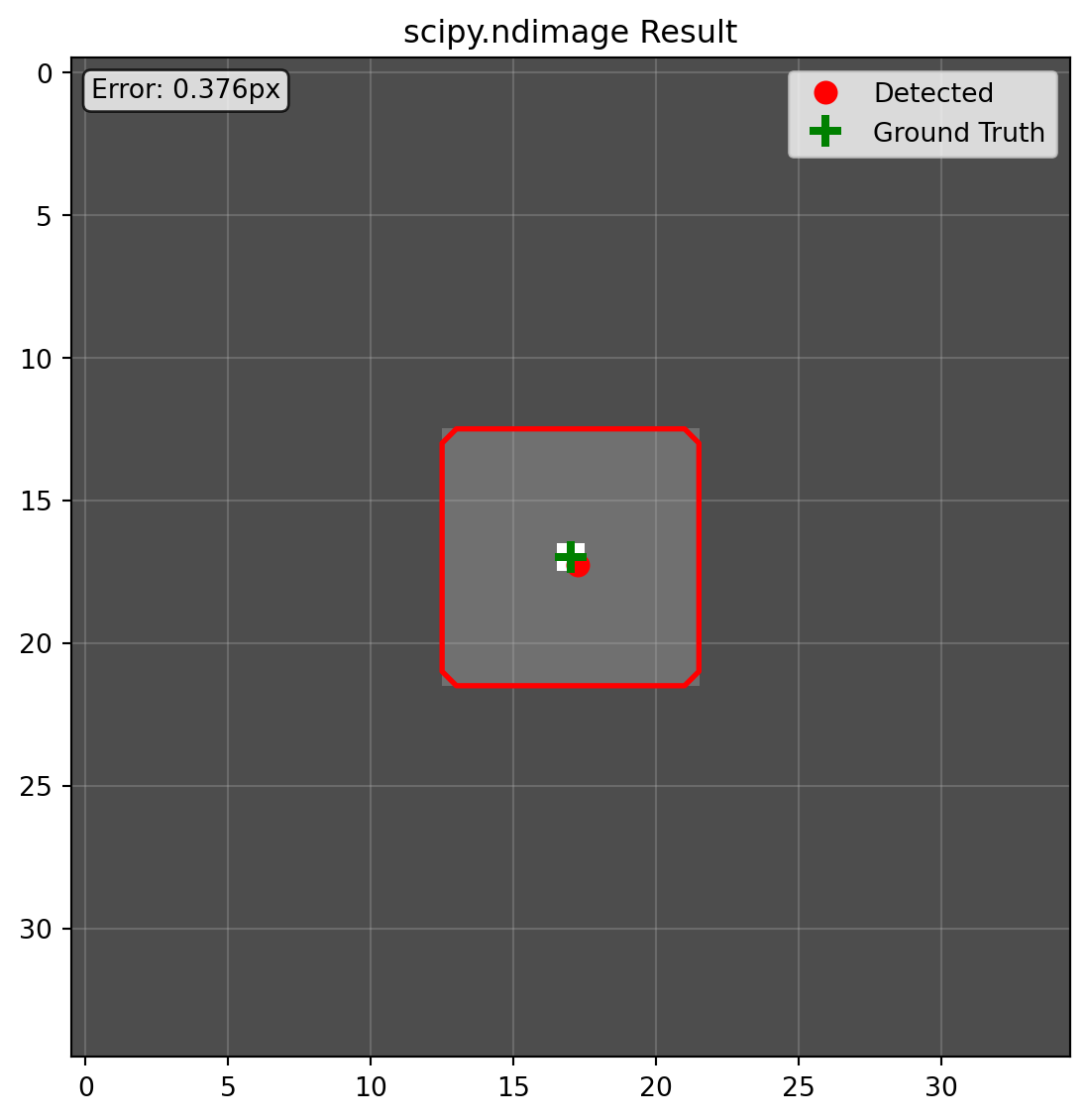
from scipy.ndimage import zoomdef process_with_scipy(img):= img[ROI_START_Y:ROI_END_Y, ROI_START_X:ROI_END_X]= TARGET_SIZE / ROI_SIZE= zoom(roi, factor, order= 1 , mode= 'constant' , cval= 0 )= get_segmentation(resampled)= get_keypoint(resampled)= keypoint / factor= keypoint_roi + [ROI_START_Y, ROI_START_X]= zoom(segment.astype(np.float32), 1.0 / factor, order= 0 , mode= 'constant' , cval= 0 )= np.zeros_like(img, dtype= np.uint8)= segment_roireturn segment_original, keypoint_originalprint ("=== scipy.ndimage ===" )= process_with_scipy(original_img)"scipy.ndimage" , true_keypoint)
Issues: manual scaling, rounding errors when reversing zoom.
Method 3: PyTorch interpolate
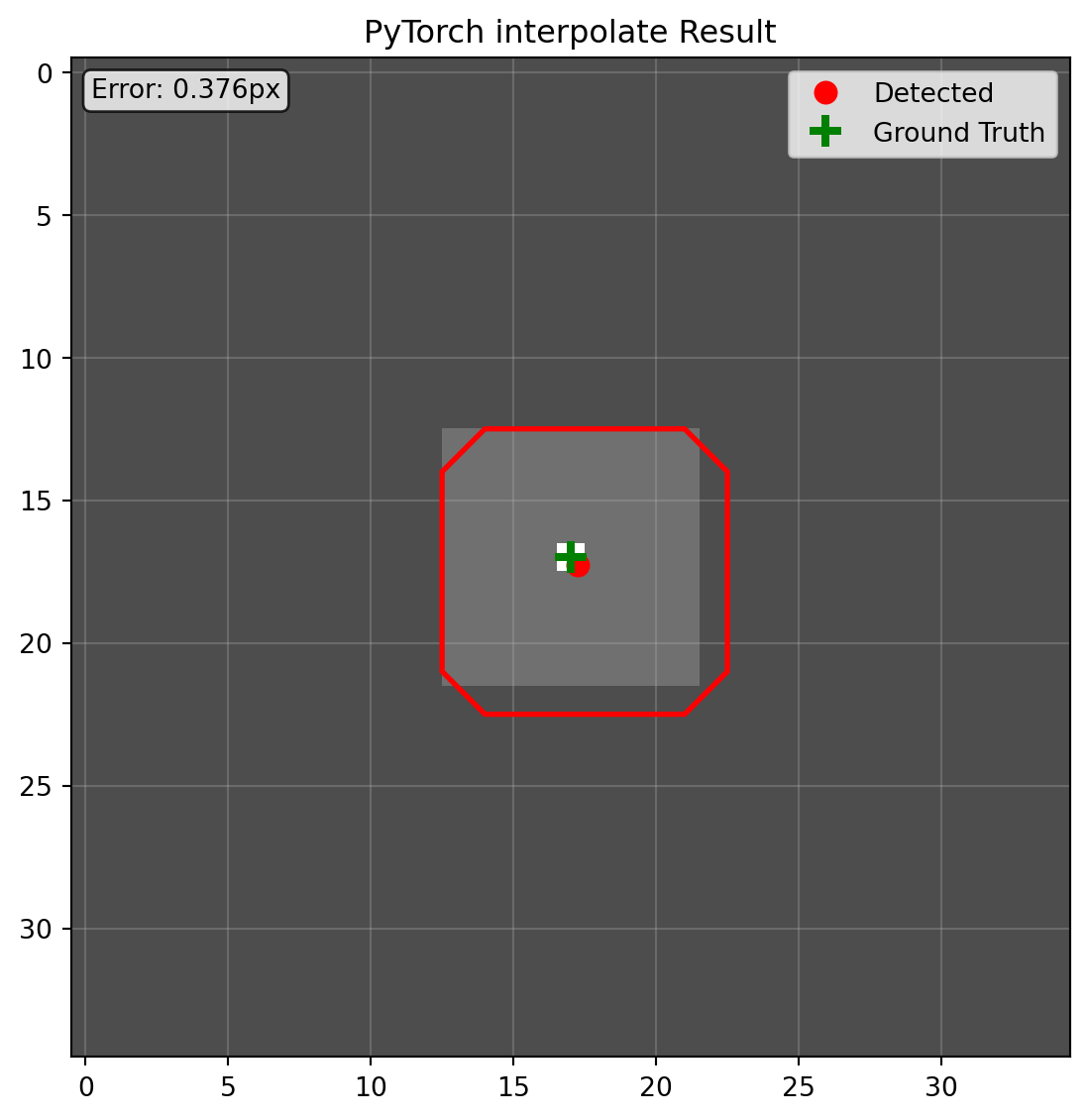
import torchimport torch.nn.functional as Fdef process_with_pytorch(img):= torch.from_numpy(img).unsqueeze(0 ).unsqueeze(0 ).float ()= tensor[:, :, ROI_START_Y:ROI_END_Y, ROI_START_X:ROI_END_X]= F.interpolate(roi_tensor, size= (TARGET_SIZE, TARGET_SIZE), mode= 'bilinear' , align_corners= False )= resampled.squeeze().numpy()= get_segmentation(resampled_arr)= get_keypoint(resampled_arr)= ROI_SIZE / TARGET_SIZE= keypoint * scale + [ROI_START_Y, ROI_START_X]= torch.from_numpy(segment.astype(np.float32)).unsqueeze(0 ).unsqueeze(0 )= F.interpolate(segment_tensor, size= (ROI_SIZE, ROI_SIZE), mode= 'nearest' ).squeeze().numpy().astype(np.uint8)= np.zeros_like(img, dtype= np.uint8)= segment_roireturn segment_original, keypoint_originalprint ("=== PyTorch ===" )= process_with_pytorch(original_img)"PyTorch interpolate" , true_keypoint)
Issues: align_corners confusion, manual batch/channel management, visible mask offset.
Results
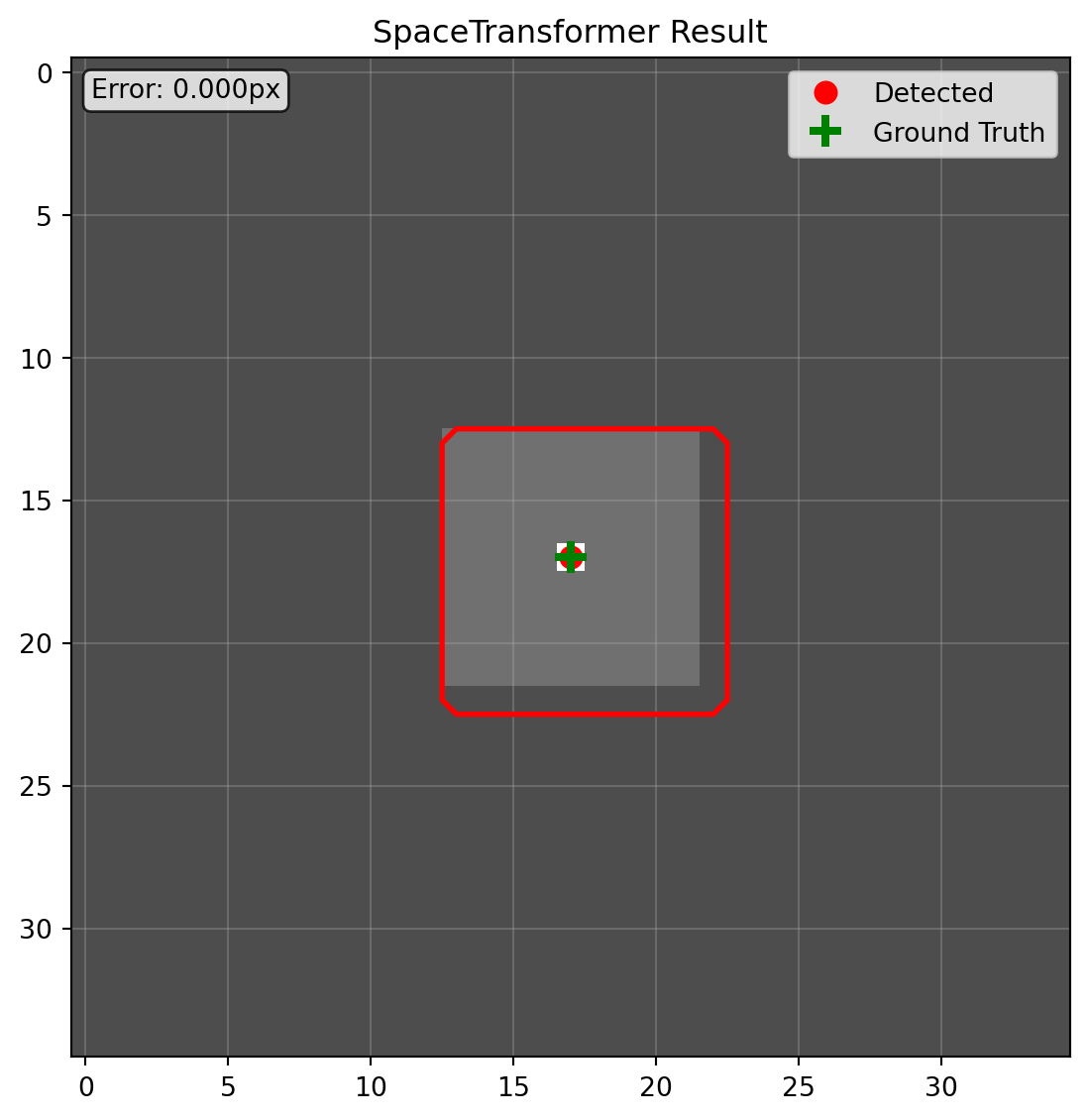
Accuracy : SpaceTransformer yields zero offset. Other methods show varying coordinate drifts; PyTorch visibly shifts the mask.Developer effort : SpaceTransformer uses a declarative space description; code is concise. Others require manual bookkeeping.Design : It separates transformation planning from execution, hiding fragile math and ensuring consistent behavior.
Next chapter dives into SpaceTransformer’s internals.